NBA 2K27 System Requirements & Download Size: Can Your PC Handle It?
I’ve played enough basketball games on PC to know that the system requirements on a store page never tell the whole story. A game might technically boot on a machine that meets the minimum specs, but that doesn’t mean you’re going to have a good time once the arena fills up, the online hub gets busy, and the game starts throwing a mountain of assets at your hardware.
That’s exactly why NBA 2K27 system requirements are worth looking at beyond the usual “minimum versus recommended” comparison.
NBA 2K27 is taking a much more demanding approach this time around. The game is built as a current-generation basketball simulation, with the older PlayStation 4 and Xbox One generation left behind. On PC, that means players should expect a game designed around newer CPUs, GPUs, faster storage, and more aggressive asset streaming.
And yes, there’s one requirement I would pay particular attention to: the SSD.
NBA 2K27 PC System Requirements
If you’re planning to play NBA 2K27 on Steam, these are the hardware specifications you’ll want to compare against your current PC.
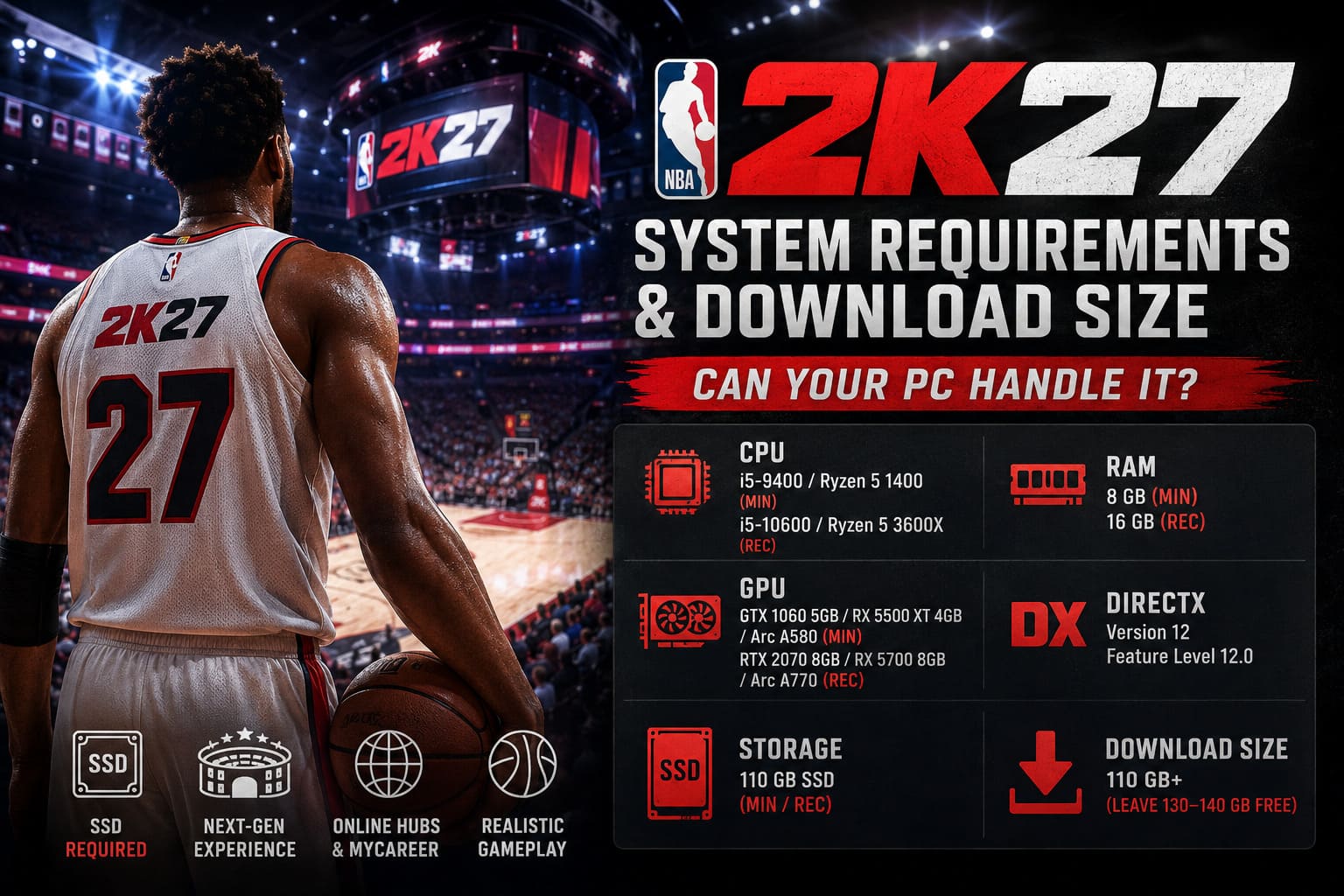
| Requirement | Minimum | Recommended |
|---|---|---|
| Operating System | Windows 10 64-Bit | Windows 11 64-Bit |
| CPU | Intel Core i5-9400 / Ryzen 5 1400 | Intel Core i5-10600 / Ryzen 5 3600X |
| RAM | 8 GB | 16 GB |
| GPU | GTX 1060 5 GB / RX 5500 XT 4 GB / Arc A580 | RTX 2070 8 GB / RX 5700 8 GB / Arc A770 |
| DirectX | Version 12, Feature Level 12.0 | Version 12 |
| Storage | 110 GB SSD | 110 GB SSD |
On paper, the minimum requirements aren’t outrageous by modern PC standards. An older gaming PC with something around a GTX 1060-class graphics card can potentially get into the game.
But I wouldn’t look at that list and immediately assume 8 GB of RAM is enough for a comfortable experience.
It isn’t that the game necessarily needs more memory just to launch. The problem is everything running alongside it. Steam, Discord, browser tabs, recording software, Windows services and other background applications can eat into that relatively small memory pool surprisingly quickly.
For a game as large and constantly updated as NBA 2K27, 16 GB of RAM is the target I’d personally recommend.
The 110 GB Requirement Is Only the Starting Point
Here’s where I think a lot of players are going to make a mistake.
NBA 2K27 requires 110 GB of available storage, and this isn’t a situation where I’d recommend clearing exactly 110 GB and calling it a day. Live-service sports games have a habit of growing over time, and NBA 2K27 is no exception if you’re planning to stick around for multiple seasons.
Roster updates, patches, new MyCAREER content, seasonal additions and other game files can gradually eat into your remaining space.
I’d personally leave 130–140 GB of free space if you have room for it.
That’s not because the initial installation necessarily takes all of that space. It’s simply a much more comfortable buffer that prevents you from constantly playing storage-management simulator every time a major update arrives.
Why an SSD Matters
The SSD requirement is arguably more important than the raw 110 GB number.
NBA 2K27 relies heavily on streaming assets, and modern sports games are constantly loading things behind the scenes: arena details, player models, textures, animations, online environments and other data.
Trying to run that kind of workload from an old mechanical HDD is asking for trouble.
- Stuttering during gameplay
- Delayed asset loading
- Texture or asset pop-in
- Longer loading screens
- Potential instability in online environments
If your PC has both an HDD and SSD, I’d install NBA 2K27 on the SSD without thinking twice. An NVMe M.2 drive is ideal, although a decent internal SATA SSD is still a perfectly sensible option.
Can a Mid-Range Gaming PC Run NBA 2K27?
This is where things get interesting.
The minimum CPU requirement of an Intel Core i5-9400 or Ryzen 5 1400 isn’t particularly intimidating. The same goes for the minimum GPU options. However, meeting the minimum specification is very different from targeting a stable, enjoyable experience.
If you’re playing standard 5v5 games, your system may have an easier time maintaining performance than when you’re wandering around larger online spaces.
That’s because environments such as MyCAREER’s online neighborhoods can put additional pressure on the CPU. More characters, objects and background activity mean the processor has more work to handle.
For that reason, I’d rather have a PC sitting around the recommended CPU tier than one that barely clears the minimum.
GPU Requirements: Where Your PC Really Starts to Matter
The recommended graphics cards — RTX 2070, RX 5700 or Intel Arc A770 — give you a much better idea of the hardware NBA 2K27 is targeting for a stronger PC experience.
The minimum GTX 1060-class hardware should be viewed as the “I want to get the game running” category.
The recommended GPUs are closer to the “I actually want this thing to look good” category.
And that’s important because NBA 2K27 is selling itself on better visual presentation, improved ProPLAY systems and modern streaming technology. Turning every graphical option down just to squeeze the game onto an aging GPU somewhat defeats the purpose.
My Recommended NBA 2K27 PC Setup
If I were building or upgrading a PC specifically for NBA 2K27, I wouldn’t aim for the bare minimum.
My personal sweet spot would be:
16 GB RAM + a recommended-tier CPU + RTX 2070/RX 5700-class GPU or better + NVMe SSD.
That gives you considerably more breathing room than simply matching the minimum requirements.
I’d also avoid filling the system drive completely. SSD performance can suffer when a drive is packed to the edge, and a large game like NBA 2K27 is going to appreciate having some breathing room.
A Few Easy Performance Tweaks
You don’t necessarily need to start dropping graphics settings everywhere if you’re experiencing frame drops. Start with the obvious troublemakers first.
- Enable Hardware-Accelerated GPU Scheduling (HAGS) in Windows if your system supports it.
- Update your NVIDIA or AMD graphics drivers using the latest stable game-ready release.
- Drop Crowd Detail to Medium if busy arenas cause noticeable FPS drops.
- Install the game on an internal SATA SSD or NVMe M.2 drive, rather than an external or mechanical HDD.
- Keep unnecessary background applications closed, especially if you’re running only 8 GB of RAM.
That last point sounds boring, but I’ve lost count of how many “my game is stuttering” problems turned out to be a browser with 30 tabs quietly eating half the available memory.
How to Fix Onimusha: Way of the Sword Audio Cut Out and Stuttering Bugs (Japanese Voice Fix)
Don’t Forget the Controller
One final recommendation from someone who has spent far too many hours with basketball games: use a controller.
You can technically play with keyboard and mouse, but NBA 2K27 is designed around dual-analog control. The combination of stick movement, timing, dribble inputs and more advanced ProPLAY mechanics makes a controller the natural choice.
An Xbox-style or PlayStation-style gamepad will give you much finer control than a keyboard in the situations where precision actually matters.
And when you’re trying to create space for that final shot with the clock running down, that’s not exactly the moment you want to be fighting your control scheme.
The Bottom Line
NBA 2K27 isn’t demanding enough to scare away every mid-range PC owner, but the minimum requirements shouldn’t be your upgrade target.
The 8 GB RAM requirement is workable on paper, yet 16 GB is the much safer choice for modern Windows gaming. The 110 GB storage requirement is also only the beginning if you’re planning to keep the game installed through future updates.
Most importantly, don’t ignore the SSD requirement. NBA 2K27 is being built around modern hardware and continuous asset streaming, so installing it on a mechanical HDD is one shortcut I simply wouldn’t take.
If your PC is somewhere around the recommended specification, has 16 GB of RAM, and uses a decent SSD, you’re in a much better position to enjoy what NBA 2K27 is actually trying to deliver rather than spending your time troubleshooting stutters and loading problems.
For me, that’s the real dividing line. Minimum specs tell you whether your PC can play the game. Recommended specs tell you whether you can actually enjoy it.