How to Fix and Recover Corrupted Save Files in The Binding of Isaac: Repentance
Losing a save in The Binding of Isaac: Repentance hits differently. This isn’t just “I lost progress” — it feels like hundreds of hours of runs, unlocks, broken builds, and late-night clutch victories just evaporated. Anyone deep into this game knows how personal those save files become.
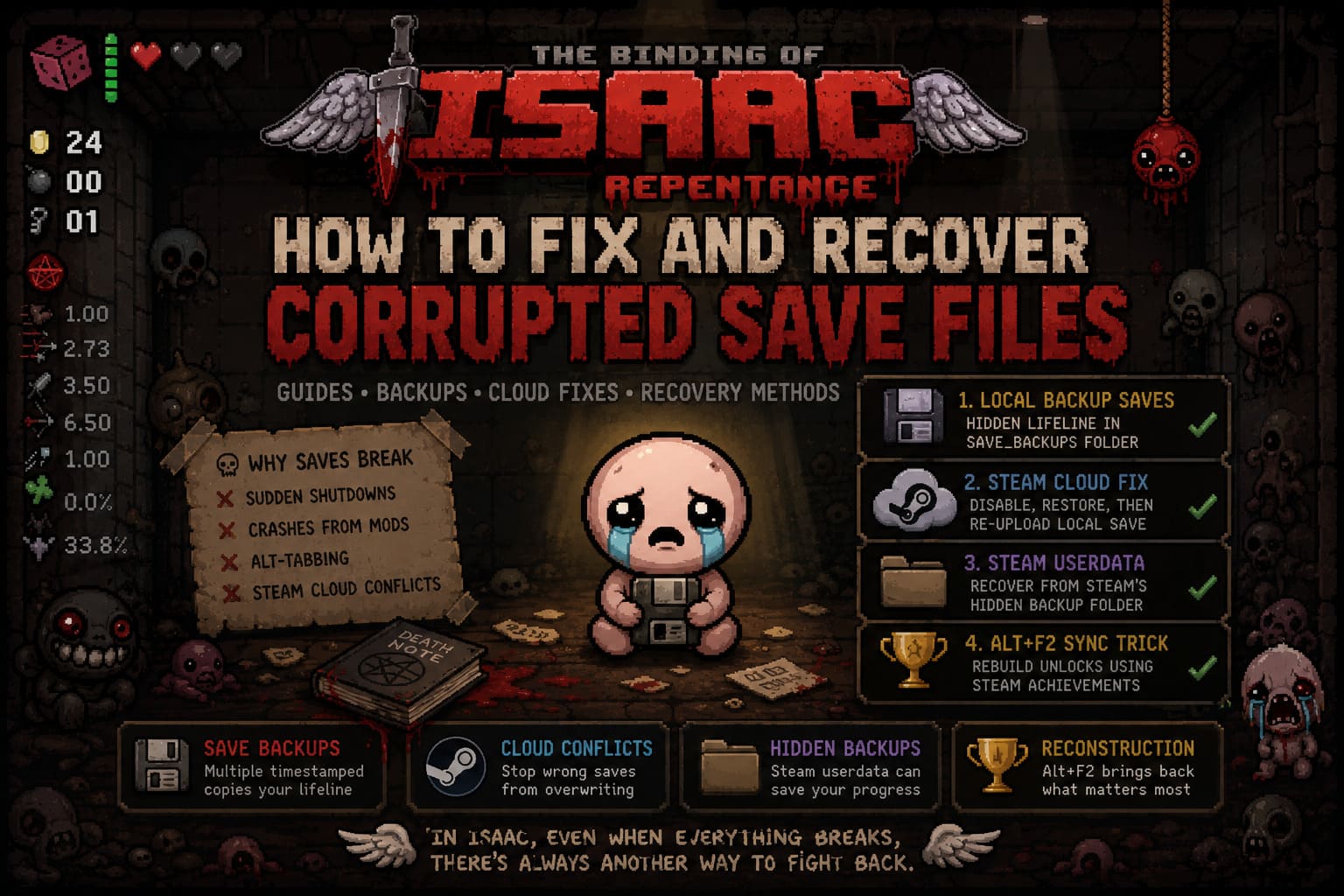
After digging through Steam threads, Reddit posts, and personal experience with corrupted saves, one thing becomes obvious: save corruption in Repentance is brutal, but not always permanent. The game actually gives you multiple recovery paths — most players just never find them.
How to Mute Players in The Binding of Isaac: Multi-Platform Voice Chat Guide
Why Save Files Break in Repentance
Save corruption usually looks random, but it almost always happens when the game is interrupted while writing data. Repentance constantly updates your progress after runs, and if something interrupts that process, things break fast.
The most common causes include sudden shutdowns, crashes from mods, alt-tabbing during loading screens, and Steam Cloud syncing the wrong file version. In many cases, a blank or outdated cloud save overwrites your real progress.
Method 1: Local Backup Saves (The Hidden Lifeline)
Repentance quietly creates backup saves in the background. This is the most important recovery method and often the one that saves everything.
Save Location
C:\Users\[YourUsername]\Documents\My Games\Binding of Isaac Repentance
Inside this folder, you will see files like persistentgamedata1.dat, persistentgamedata2.dat, and persistentgamedata3.dat. These represent your save slots, and when corruption happens they may shrink to 0 KB or become unusable.
Backup Folder
The real recovery power is inside the save_backups folder. This directory stores timestamped versions of your saves.
Look for files like 20260630.persistentgamedata1.dat. The numbers represent the date of the backup.
Recovery Steps
Open save_backups and find the most recent working file with a normal size (usually 20–100 KB). Copy it out, replace the corrupted file in the main directory, and rename it back to persistentgamedata1.dat. After launching the game, your save often returns exactly as it was.

Method 2: Fixing Steam Cloud Conflicts
Steam Cloud can either save your progress or destroy it. If it keeps re-downloading corrupted data, your fixes won’t stick.
Start by disabling Steam Cloud for The Binding of Isaac: Rebirth in Steam properties. Restore your local backup using Method 1, then launch the game once to force a fresh local save.
After confirming your progress is back, re-enable Steam Cloud. When Steam detects a conflict, choose to upload local files instead of downloading cloud data. This prevents the corrupted version from returning.
Method 3: Steam Userdata Folder Recovery
There is another hidden backup location inside Steam itself. It is often overlooked but can contain a working save even when Documents folder backups fail.
Steam Path
C:\Program Files (x86)\Steam\userdata\
Inside, you will see folders named with long numeric IDs. One of them is your Steam account. Inside your ID folder, navigate to 250900, which is the Binding of Isaac: Repentance directory.
Inside the remote folder, you will find files like rep_persistentgamedata1.dat. These can sometimes be copied back into your Documents folder to restore progress.
Method 4: Achievement-Based Save Reconstruction
When everything else fails, Repentance has one last built-in recovery system tied to Steam achievements. It won’t restore everything perfectly, but it can rebuild a functional save.
How to Use It
Launch the game, select an empty save slot, open the Stats menu, and press Alt + F2. The game will sync with your Steam achievements and rebuild unlocks based on what you have completed.
This restores characters, items, and challenges, but some elements like completion marks and win streaks may not fully return.

Save Recovery Comparison
| Method | Difficulty | Success Rate | Recovery Type |
|---|---|---|---|
| Local Backup Restore | Easy | Very High | Full Save Recovery |
| Steam Cloud Reset | Medium | High | Full Save After Sync Fix |
| Steam Userdata Swap | Medium | Medium | Partial or Full Save |
| Alt+F2 Sync Trick | Easy | Situational | Unlock Reconstruction |
Preventing Future Save Corruption
The best defense is good habits. Most save corruption comes from timing issues or unstable setups rather than pure bad luck.
Avoid alt-tabbing during loading transitions or saving moments. Let Steam fully finish syncing before shutting down your PC. If you use mods, especially large overhaul packs, back up your saves weekly.
One of the simplest but most effective habits is manually copying your save folder before major mod changes. It takes seconds but can save hundreds of hours.
Final Thoughts
Save corruption in The Binding of Isaac: Repentance feels devastating the first time it happens. You go from a fully built save to an empty slot in seconds, and the game gives no warning.
But the recovery system is stronger than it looks. Between local backups, Steam userdata copies, cloud conflict resolution, and achievement-based reconstruction, there are multiple ways to bring your progress back.
In the end, surviving in Isaac isn’t just about dodging bullets and building broken synergies — it’s also about knowing how to recover when the system itself breaks down.