Silent Hill Townfall PS5 DualSense Haptic Feedback Settings Guide
If there is one thing I have learned after spending way too many hours with survival horror games, it is that immersion is not just about graphics. A gorgeous foggy environment means very little if the controller feels completely dead in your hands. Silent Hill Townfall takes a much more interesting approach, using the PS5 DualSense to make exploration, combat, danger, and even the game’s strangest technological objects feel physical.
Set against the unsettling atmosphere of the isolated Scottish island of St. Amelia, Townfall leans heavily into psychological horror rather than simple jump scares. The first-person perspective puts you directly behind Simon Ordell’s eyes, while the oppressive fog and unpredictable threats constantly mess with your sense of security. When the DualSense starts reacting to what is happening around you, that tension gets another layer.
How to Fix Silent Hill Townfall Controller Not Working on Steam
I’ve always preferred horror games with restrained controller feedback. When every two seconds produces a giant rumble, you stop noticing it. Townfall works best when the DualSense knows when to stay quiet. A subtle vibration beneath your fingers can be far more disturbing than a controller that shakes like it is trying to escape your hands.
If you’re playing on PS5 and want the strongest possible combination of immersion, environmental awareness, and horror atmosphere, these are the settings I would start with.
Why DualSense Matters So Much in Silent Hill Townfall
The DualSense is at its best when developers use it as part of the game’s sound and visual language rather than treating it as an upgraded rumble motor. Townfall’s horror benefits enormously from that philosophy because the player is often surrounded by fog, darkness, strange sounds, and unreliable information.
Instead of simply telling you that something is nearby, the controller can reinforce that feeling physically. Footsteps, environmental disturbances, injury effects, mechanical interactions, and other moments of tension can translate into subtle sensations in your hands.
That matters particularly in a first-person horror game. You cannot always see what is happening, and that uncertainty is half the fun.
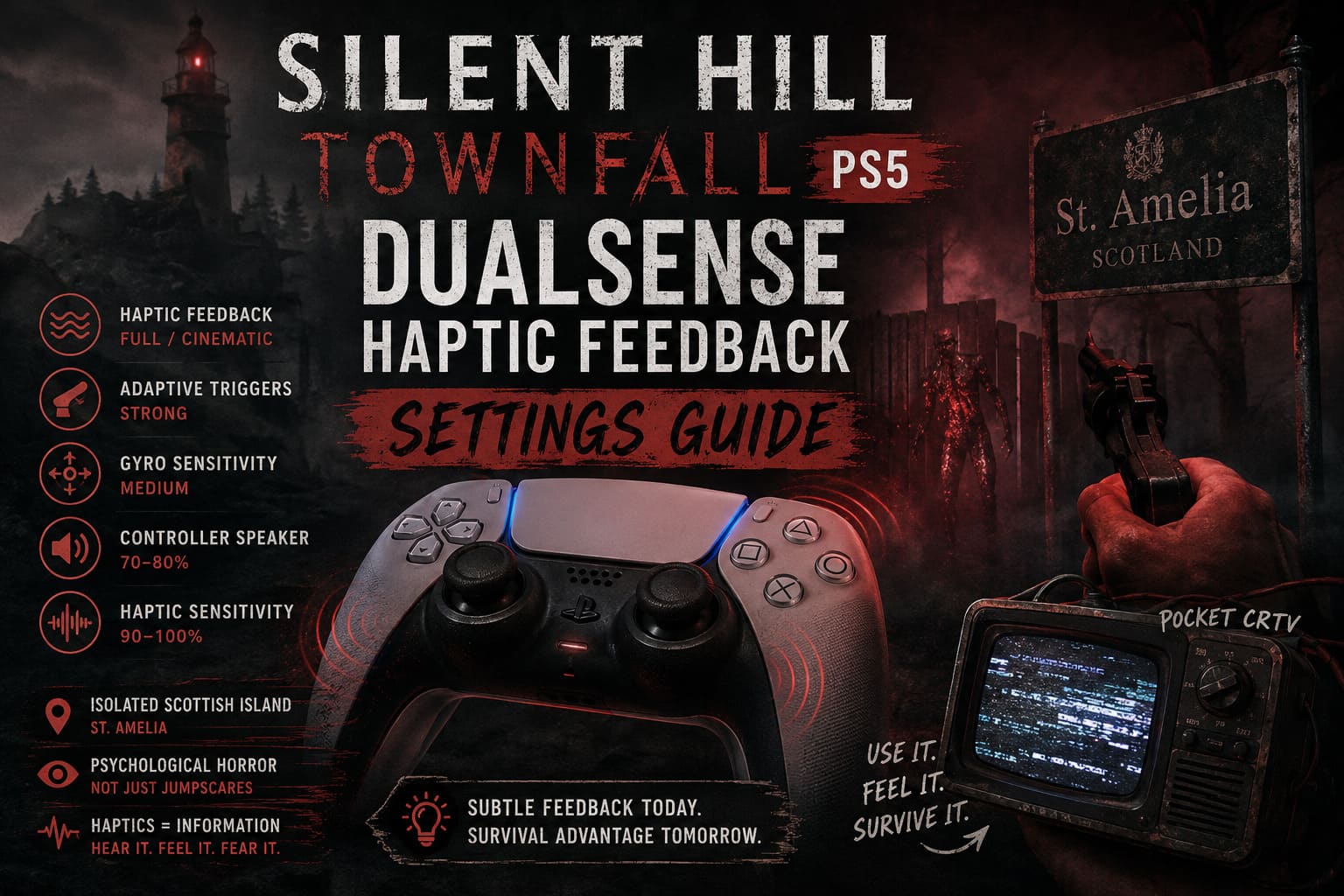
The DualSense Features Worth Enabling
| Feature | Recommended Setting | Why It Matters |
|---|---|---|
| Haptic Feedback | Strong / Full | Maximizes environmental and gameplay sensations |
| Adaptive Triggers | Strong | Adds physical resistance during combat |
| Gyroscope | Medium | Keeps motion controls responsive without excessive movement |
| Controller Speaker | 70–80% | Makes small audio effects more noticeable |
| Haptic Sensitivity | 90–100% | Preserves subtle warning signals |
The important thing is not simply turning every slider to maximum. You want useful feedback, not controller noise. If the vibration becomes so aggressive that you stop noticing individual patterns, lower the intensity slightly.
Best PS5 DualSense System Settings
Before touching the in-game options, I recommend checking the PS5’s controller configuration. These system-level settings can affect how strongly DualSense features behave.
Go to your PS5 settings and open the controller options under Accessories. From there, adjust the available vibration, trigger, and speaker controls.
Vibration Intensity: Strong
This is my first recommendation for a horror game like Townfall.
Set Vibration Intensity to Strong. Environmental effects can be incredibly subtle, and lowering the setting too much can make them disappear into the background.
You don’t necessarily need maximum vibration throughout the entire game. What you want is enough intensity for your brain to distinguish between a tiny environmental reaction and a major gameplay event.
Rain, movement, impacts, machinery, nearby threats, and other environmental interactions can feel considerably more convincing when the controller has enough range to communicate those differences.
Trigger Effect Intensity: Strong
If you’re comfortable with adaptive triggers, leave them on Strong.
This is especially worthwhile during combat. Pulling a trigger should not feel exactly the same when you’re firing a weapon, interacting with equipment, or performing another physical action.
The resistance adds a tiny amount of physical friction between you and the action on screen. That sounds insignificant, but during a stressful encounter it can make combat feel noticeably more physical.
If your hands become tired during longer sessions, Medium is a perfectly reasonable compromise.
Controller Speaker Volume: Around 70–80%
I wouldn’t immediately push the controller speaker to maximum.
A setting around 70–80% gives small sounds enough presence without making the controller speaker dominate your headset or television audio. Static, radio-like interference, mechanical noises, and other localized effects can become surprisingly effective when they appear to come directly from the device in your hands.
And honestly, controller speaker audio is one of those features that developers can absolutely waste. When used sparingly in horror, though, it can be creepy as hell.
Recommended Silent Hill Townfall In-Game Settings
Once you’ve configured the PS5 itself, move into the game’s Controller and Accessibility menus.
My preferred setup looks like this:
- Haptic Feedback: Full / Cinematic
- Haptic Sensitivity: 90–100%
- Adaptive Triggers: Enabled
- Gyro Sensitivity: Medium
- Controller Speaker: Enabled
- Controller Audio: Separate where available
This configuration prioritizes immersion without making the controller unnecessarily aggressive.
Haptic Feedback: Full or Cinematic
If Townfall gives you an option for a complete haptic profile, use it.
The whole point of playing a psychological horror game with a DualSense is to experience those tiny physical details. Turning haptics down too far can remove some of the atmosphere that makes the PS5 version special.
The best horror feedback is often barely noticeable at first. You feel something, wonder what caused it, and then start paying closer attention.
That’s exactly the kind of paranoia a Silent Hill game should encourage.
Haptic Sensitivity: 90–100%
For a first playthrough, I would use 100%.
After several hours, you may decide that 90% feels better. That’s particularly true if you are sensitive to constant controller movement or tend to play long sessions.
I wouldn’t immediately drop it to a very low value, though. The subtle changes in feedback are part of the experience, and you don’t want to remove them before discovering what the game actually does with the system.
Adaptive Triggers: Keep Them On
Adaptive triggers are one of the easiest DualSense features to appreciate in survival horror.
When you’re already stressed because you think something is moving somewhere beyond the fog, having the trigger physically resist your finger adds another little layer of tension.
Keep Adaptive Triggers enabled for your first playthrough.
If you’re replaying the game for speed, achievement hunting, or a harder difficulty run, you may eventually prefer weaker resistance because it makes repeated actions faster. For a blind first run, however, the physical feedback is absolutely worth experiencing.
Gyro Controls: Medium Is the Sweet Spot
Motion controls can be fantastic when implemented carefully and incredibly annoying when they are too sensitive.
For Townfall’s interactive objects and equipment, I recommend starting with Medium gyro sensitivity.
A high setting may sound attractive because it promises faster response, but precision is more important in a horror game. You don’t want a tiny movement of your hands to send an object or viewpoint flying when you’re already trying not to panic.
Medium gives you enough responsiveness while keeping the controls predictable.
The Pocket CRTV Could Be One of the Best Uses of the DualSense
One of the more interesting elements described for Townfall is the pocket CRT television. It isn’t simply another inventory item. Its relationship with unstable analog signals and environmental clues gives it a distinct identity.
Using motion controls to manipulate something that looks and behaves like old-fashioned technology is a perfect fit for the DualSense.
The physical interaction becomes more convincing when the controller reacts to the device. Static and interference can be accompanied by small vibrations and speaker effects, creating the sensation that you’re actually holding some malfunctioning piece of electronics.
This is exactly the kind of gimmick I want in a horror game.
Not every feature needs to be useful in a conventional gameplay sense. Sometimes making an object feel weird and unpleasant is enough.
Why You Shouldn’t Max Everything Automatically
Here’s my biggest warning: maximum settings are not automatically the best settings.
I’ve played plenty of games where developers go completely overboard with controller feedback. Every door produces a vibration. Every footstep shakes the grips. Every bullet creates resistance. After twenty minutes, your brain filters everything out.
Horror depends on contrast.
If Townfall gives you almost no feedback while you’re walking through an empty building and suddenly the DualSense responds to something behind you, you’re going to notice it immediately. That moment of silence followed by a tiny physical reaction can be much more effective than constant rumbling.
That’s why I recommend Full haptics but still leave room to reduce sensitivity if the feedback starts becoming repetitive.
Using Haptics as a Survival Tool
The coolest possibility here isn’t simply immersion. Haptic feedback can potentially become another source of information.
When visibility is limited by fog or darkness, players naturally depend more heavily on audio cues. If the controller provides directional or situational feedback, you gain another layer of information without needing to stare at the screen.
That can be especially useful during stealth sections.
Imagine hearing something nearby, seeing almost nothing through the fog, and then feeling a faint response through one side of the controller. You don’t necessarily know exactly where the enemy is, but you know enough to become nervous and change your position.
That’s great survival-horror design.
You shouldn’t feel like the controller is giving you a radar. It should give you just enough information to make you paranoid.
What the Community Should Pay Attention To
Comparisons with the haptic implementation in other PlayStation horror titles are inevitable. The important question isn’t whether Townfall uses more vibration than another game. It’s whether the feedback has a meaningful relationship with what is happening on screen.
That is where I would judge the system.
Does the controller distinguish between environmental effects and genuine danger? Does it become quieter when the game wants you to feel isolated? Does it communicate tension without turning every interaction into a carnival ride?
If the answer is yes, then the DualSense implementation could become one of Townfall’s strongest immersion tools.
DualSense Haptics Not Working? Try These Fixes
If you aren’t getting any haptic feedback or adaptive trigger resistance, don’t immediately assume the controller is broken.
1. Update the Controller
Connect the DualSense to your PS5 with a USB cable and check whether controller software needs an update. Outdated controller firmware can cause unexpected behavior with newer games.
2. Check the PS5 Controller Settings
Make sure vibration and trigger effects haven’t been disabled at the system level. A game cannot deliver effects that the console has globally turned off.
3. Check the Battery
If the controller battery is critically low, connect it to the PS5 and let it charge before troubleshooting anything more complicated.
4. Reset the DualSense
If everything looks correct but the controller still refuses to respond properly, power down the console and use the small reset button on the back of the DualSense. Reconnect the controller through USB and pair it with the console again.
5. Test Another Controller
If possible, test another DualSense. This quickly tells you whether the issue is related to the game, console configuration, or the controller itself.
My Recommended Setup at a Glance
| Setting | My Pick | Best For |
|---|---|---|
| Vibration | Strong | Maximum environmental detail |
| Trigger Effects | Strong | Immersive combat |
| Haptic Feedback | Full / Cinematic | First playthrough |
| Haptic Sensitivity | 90–100% | Maximum awareness |
| Gyro | Medium | Stable motion control |
| Speaker | 70–80% | Localized audio effects |
Final Verdict: Let the DualSense Make You Uncomfortable
The best survival horror experiences aren’t the ones that constantly scream at you. They’re the games that make you question what you just heard, what moved in the darkness, and whether that tiny sensation in your hands was actually part of the game.
That’s why I would play Silent Hill Townfall with the DualSense features fully enabled on a first playthrough. Start with Strong vibration, Strong trigger effects, Full haptics, Medium gyro sensitivity, and around 70–80% controller speaker volume. If the feedback becomes tiring, lower the sensitivity rather than disabling the entire system.
The real magic happens when the controller becomes part of the atmosphere instead of another source of noise. The fog should hide things from your eyes. The sound should make you question what you’re hearing. The DualSense should make your hands wonder what the hell is happening.
For a game built around psychological discomfort, that’s exactly where the controller belongs.