Assassin’s Creed Black Flag Resynced: Best PC Settings for RTX 4070 (144FPS Optimization Guide)
I have spent hundreds of hours sailing across the Caribbean since the original Assassin’s Creed IV: Black Flag launched, so jumping into Black Flag Resynced felt like returning home—except that home suddenly had fully ray-traced lighting, dramatically improved weather effects, richer vegetation, and enough visual upgrades to make my RTX 4070 work far harder than I expected.
The problem is simple.
The game looks incredible.
The performance presets, however, are anything but incredible.
Like many PC players, I immediately selected Ultra High, assumed everything would be fine, and was greeted by random frame drops, inconsistent frametimes, occasional cinematic frame locks, and GPU usage that made absolutely no sense. After several evenings of testing, reading community benchmarks, experimenting with driver settings, and comparing performance in ports, forests, naval battles, and dense cities, I finally found a setup that delivers what I actually wanted—a consistently smooth 144 FPS experience while keeping the Caribbean looking stunning.
If you’re using an RTX 4070, this guide should save you a lot of trial and error.
Why Black Flag Resynced Is More Demanding Than It Looks
On paper, the RTX 4070 should have no trouble with this game.
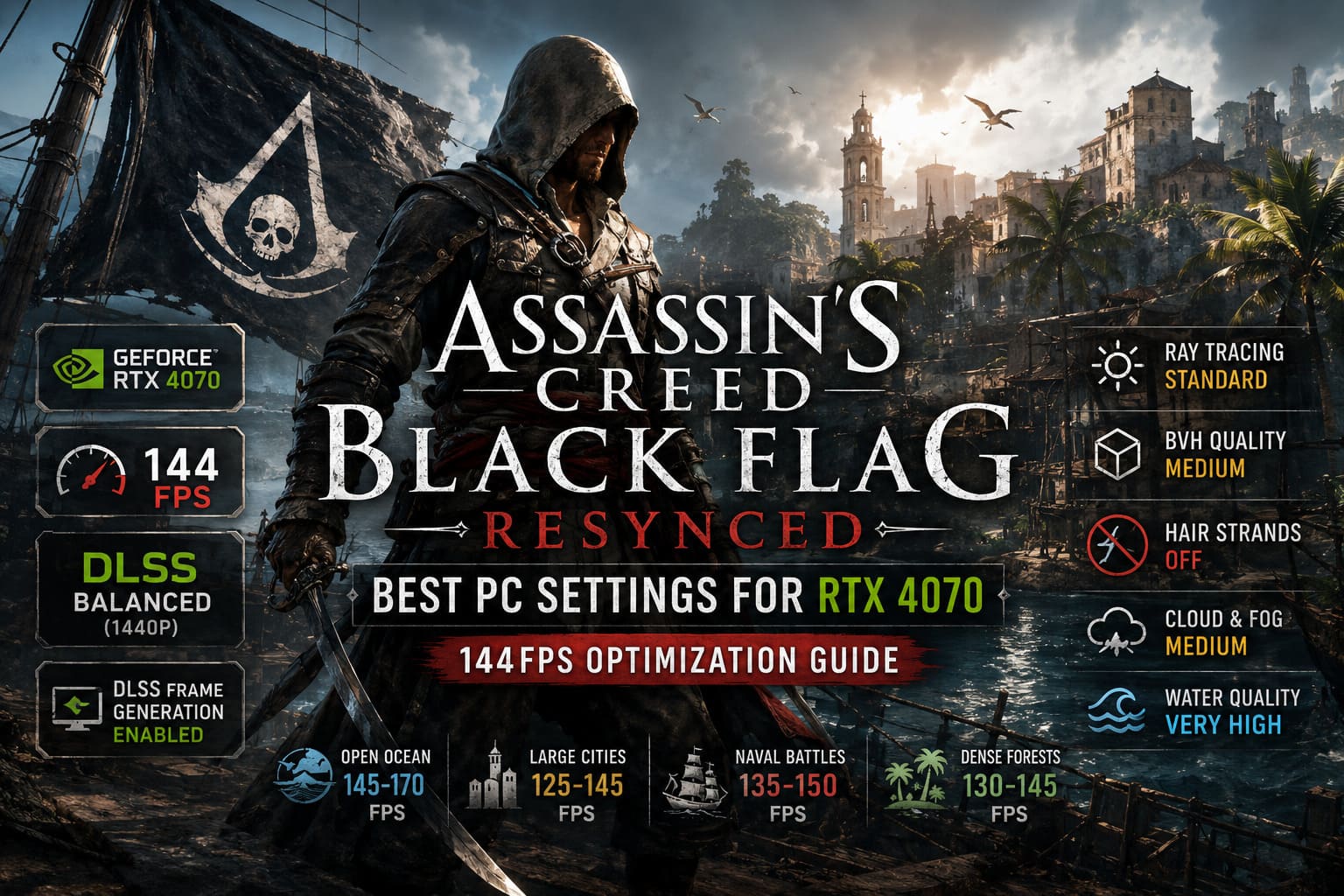
It offers:
- 12 GB of GDDR6X VRAM
- Excellent ray tracing hardware
- DLSS Frame Generation support
- Plenty of rasterization performance for modern AAA titles
Yet Black Flag Resynced isn’t a normal remake.
Ubisoft rebuilt enormous portions of the rendering pipeline. Real-time global illumination, advanced geometry rendering, denser environmental detail, volumetric lighting, upgraded water simulation, and modern BVH calculations all place heavy pressure on the GPU.
Interestingly, raw GPU power isn’t always the limiting factor.
Several graphics options consume far more resources than their visual improvements justify. That’s exactly where optimization makes the biggest difference.
My Recommended RTX 4070 Graphics Settings
After dozens of benchmark runs, this became my preferred setup.
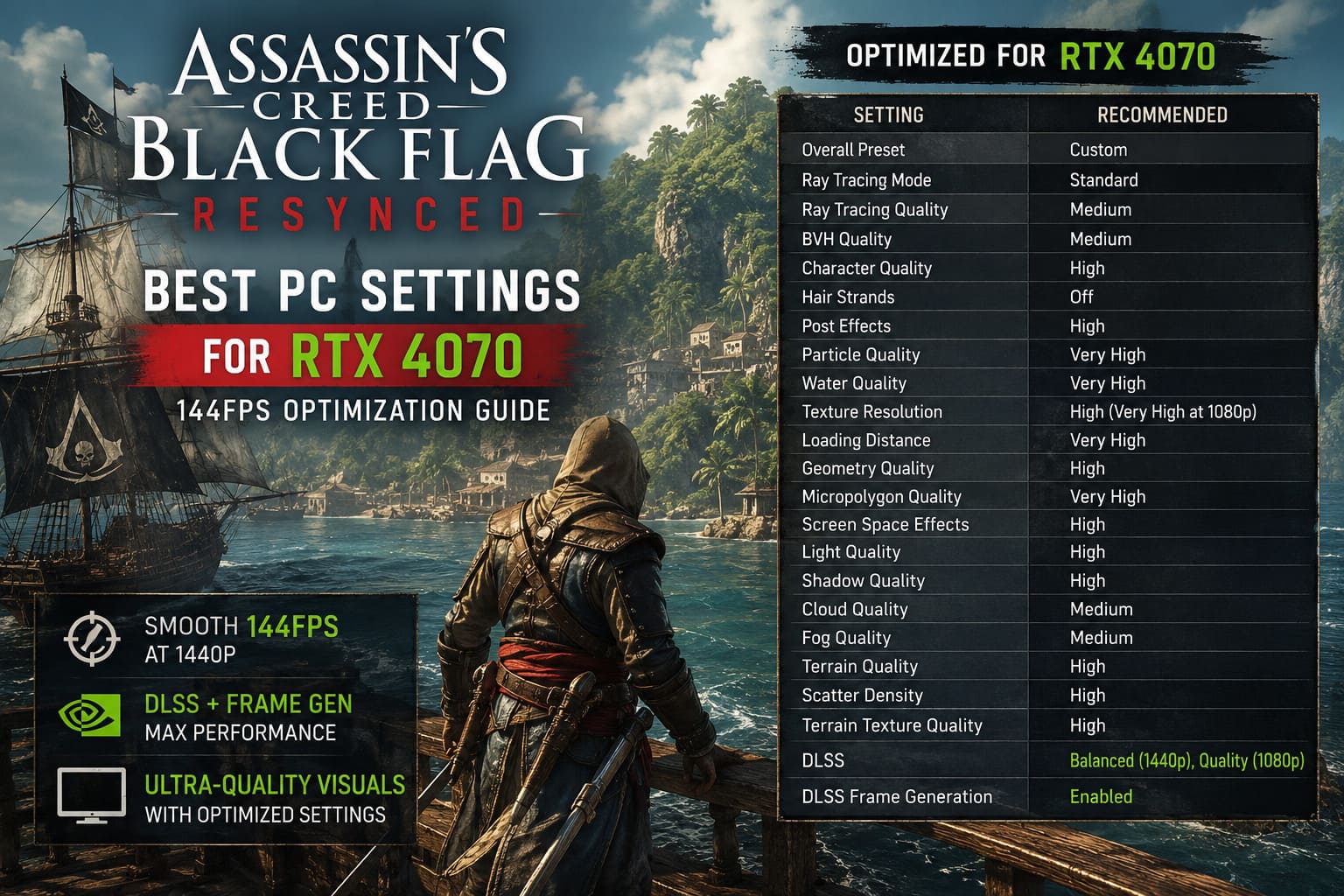
| Setting | Recommended Value |
|---|---|
| Overall Preset | Custom |
| Ray Tracing Mode | Standard |
| Ray Tracing Quality | Medium |
| BVH Quality | Medium |
| Character Quality | High |
| Hair Strands | Off |
| Post Effects | High |
| Particle Quality | Very High |
| Water Quality | Very High |
| Texture Resolution | High (Very High at 1080p) |
| Loading Distance | Very High |
| Geometry Quality | High |
| Micropolygon Quality | Very High |
| Screen Space Effects | High |
| Light Quality | High |
| Shadow Quality | High |
| Cloud Quality | Medium |
| Fog Quality | Medium |
| Terrain Quality | High |
| Scatter Density | High |
| Terrain Texture Quality | High |
| DLSS | Balanced (1440p), Quality (1080p) |
| DLSS Frame Generation | Enabled |
This configuration keeps visuals extremely close to Ultra while recovering a surprisingly large amount of GPU performance.
The Biggest FPS Killer Nobody Talks About
If I had to disable only one option, it wouldn’t be shadows.
It wouldn’t even be ray tracing.
It would be Hair Strands.
This setting looks impressive during close-up conversations, but once multiple characters appear during boarding fights or busy city scenes, frame times become noticeably inconsistent.
Turning Hair Strands Off gave me one of the largest performance gains I measured.
The visual downgrade? Honestly, I had to actively look for it.
During normal gameplay, I completely forgot it was disabled.
Ray Tracing: Don’t Chase the Highest Setting
This game’s ray tracing implementation is surprisingly good.
Sunlight bouncing through tropical villages, reflections across wet docks, and indirect lighting inside taverns all benefit from RT.
The temptation is to push everything to Extended.
Don’t.
The performance cost rises dramatically while the visual improvement becomes increasingly difficult to notice during actual gameplay.
Keeping Ray Tracing Mode: Standard and Ray Tracing Quality: Medium maintains beautiful lighting while avoiding unnecessary GPU load.
I’d rather enjoy smooth sword fights than gain a few barely noticeable light reflections.
BVH Quality Is More Important Than Most Players Realize
BVH (Bounding Volume Hierarchy) controls how efficiently the engine processes ray tracing interactions.
Higher values increase scene complexity considerably.
Busy locations like:
- Havana
- Nassau
- Kingston
can become noticeably heavier with BVH pushed to maximum.
Dropping it to Medium dramatically improved minimum frame rates during city exploration while leaving image quality almost unchanged.
This setting is probably one of the best “free FPS” tweaks available.
Clouds and Fog Look Amazing—Until They Tank Your GPU
One thing Ubisoft absolutely nailed is weather.
Storms are breathtaking.
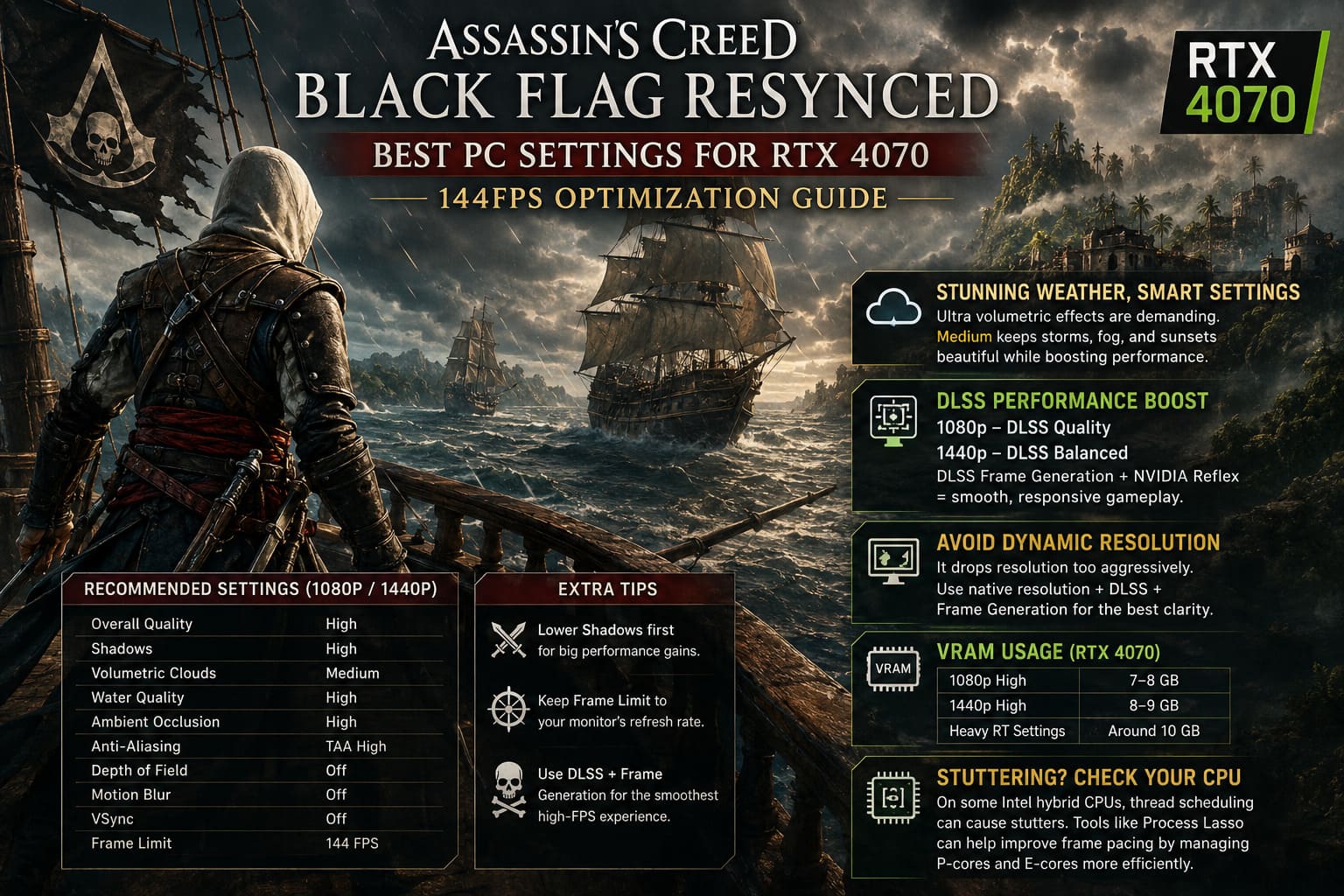
Dense fog rolling across the ocean feels cinematic.
Unfortunately, Ultra volumetric effects are extremely expensive.
Medium settings still preserve thick tropical atmosphere, ocean haze, dramatic sunsets, and storm immersion while reducing GPU workload substantially.
During naval combat, I honestly couldn’t tell the difference unless I paused and compared screenshots.
DLSS Makes the RTX 4070 Shine
This is one of those games where DLSS genuinely feels like magic.
For 1080p, I preferred:
- DLSS Quality
For 1440p, I settled on:
- DLSS Balanced
Image quality remained crisp, and the extra performance headroom helped maintain high refresh rates during larger battles.
Frame Generation deserves special praise here.
Unlike early implementations from a few years ago, DLSS Frame Generation feels surprisingly responsive in Black Flag Resynced.
Combined with NVIDIA Reflex, input latency stayed low enough that combat never felt sluggish.
Skip Dynamic Resolution
Dynamic Resolution sounds useful.
In practice, I wasn’t impressed.
The game frequently lowered internal rendering resolution too aggressively, making distant objects appear softer than necessary.
Instead, I recommend sticking with native resolution, DLSS, and Frame Generation.
The image remains noticeably cleaner while maintaining better overall consistency.
VRAM Usage Is Better Than Expected
Many players worried that 12 GB wouldn’t be enough.
Thankfully, that hasn’t been my experience.
| Resolution | Typical VRAM Usage |
|---|---|
| 1080p High | 7–8 GB |
| 1440p High | 8–9 GB |
| Heavy RT Settings | Around 10 GB |
The RTX 4070 still has enough headroom without constantly hitting memory limits.
Stuttering Isn’t Always Your GPU
This surprised me the most.
Some stutters had nothing to do with graphics settings.
On certain Intel hybrid processors, thread scheduling occasionally produced inconsistent frame pacing.
Many experienced PC enthusiasts have reported smoother gameplay after experimenting with CPU affinity tools like Process Lasso.
Depending on the processor, limiting how the game uses Performance Cores and Efficient Cores can reduce random hitching.
It’s definitely not required for everyone, but if your FPS counter looks healthy while gameplay still feels uneven, CPU scheduling may be worth investigating.
Extra Tweaks That Helped My Performance
Besides changing graphics settings, I also made a few system adjustments.
These won’t magically double your FPS, but together they noticeably improved overall smoothness.
- Install the latest NVIDIA Game Ready Driver.
- Keep Windows Game Mode enabled.
- Install the game on a fast NVMe SSD.
- Close unnecessary background overlays.
- Disable software recording if you aren’t actively using it.
- Restart the game after changing major graphics options.
The SSD recommendation deserves particular attention.
Black Flag Resynced streams a tremendous amount of environmental data while sailing between islands, and mechanical hard drives simply struggle to keep up.
Real-World Performance I Experienced
Using an RTX 4070 paired with a modern gaming CPU, I consistently saw performance around these numbers.
| Scenario | Average FPS |
|---|---|
| Open Ocean | 145–170 FPS |
| Small Islands | 140–155 FPS |
| Large Cities | 125–145 FPS |
| Naval Battles | 135–150 FPS |
| Dense Forest Areas | 130–145 FPS |
Your exact numbers will obviously depend on CPU, RAM speed, and storage, but these settings provided an excellent balance between visual quality and responsiveness.
Final Thoughts
Black Flag Resynced proves that visual upgrades don’t automatically require sacrificing smooth gameplay. The default Ultra preset pushes several expensive rendering features far beyond the point of meaningful visual returns, and that’s exactly where the RTX 4070 starts to lose efficiency.
After plenty of testing, my biggest takeaway is simple: smart optimization beats blindly maxing every slider. Turning down a handful of notoriously demanding settings—especially Hair Strands, BVH Quality, and the most aggressive ray tracing options—preserves nearly all of the game’s breathtaking presentation while freeing enough GPU headroom to stay comfortably within the 144 Hz range.
Pair those tweaks with DLSS, Frame Generation, up-to-date NVIDIA drivers, and a fast NVMe SSD, and Black Flag Resynced transforms into exactly what I hoped it would be: a gorgeous modern return to one of the greatest pirate adventures ever made, complete with fluid combat, stable exploration, and spectacular Caribbean sunsets that finally match today’s hardware.
If there’s one lesson I learned after countless benchmark runs, it’s this: don’t chase every Ultra setting. Chase the experience. A locked, responsive 144 FPS while commanding the Jackdaw through crystal-clear waters feels far better than a prettier screenshot that struggles to stay smooth. That’s the balance every PC gamer should be aiming for.