Twitch Drops for NBA 2K27: Guide to Free Rewards & Locker Codes (2026)
I’ll be honest: when a new NBA 2K launches, the first thing I want to do is play. I’m not usually interested in spending hours watching somebody else play basketball when I could be on the court building my own MyPLAYER or putting together a new MyTEAM lineup.
But NBA 2K27 has given me a pretty good reason to leave Twitch running in the background.
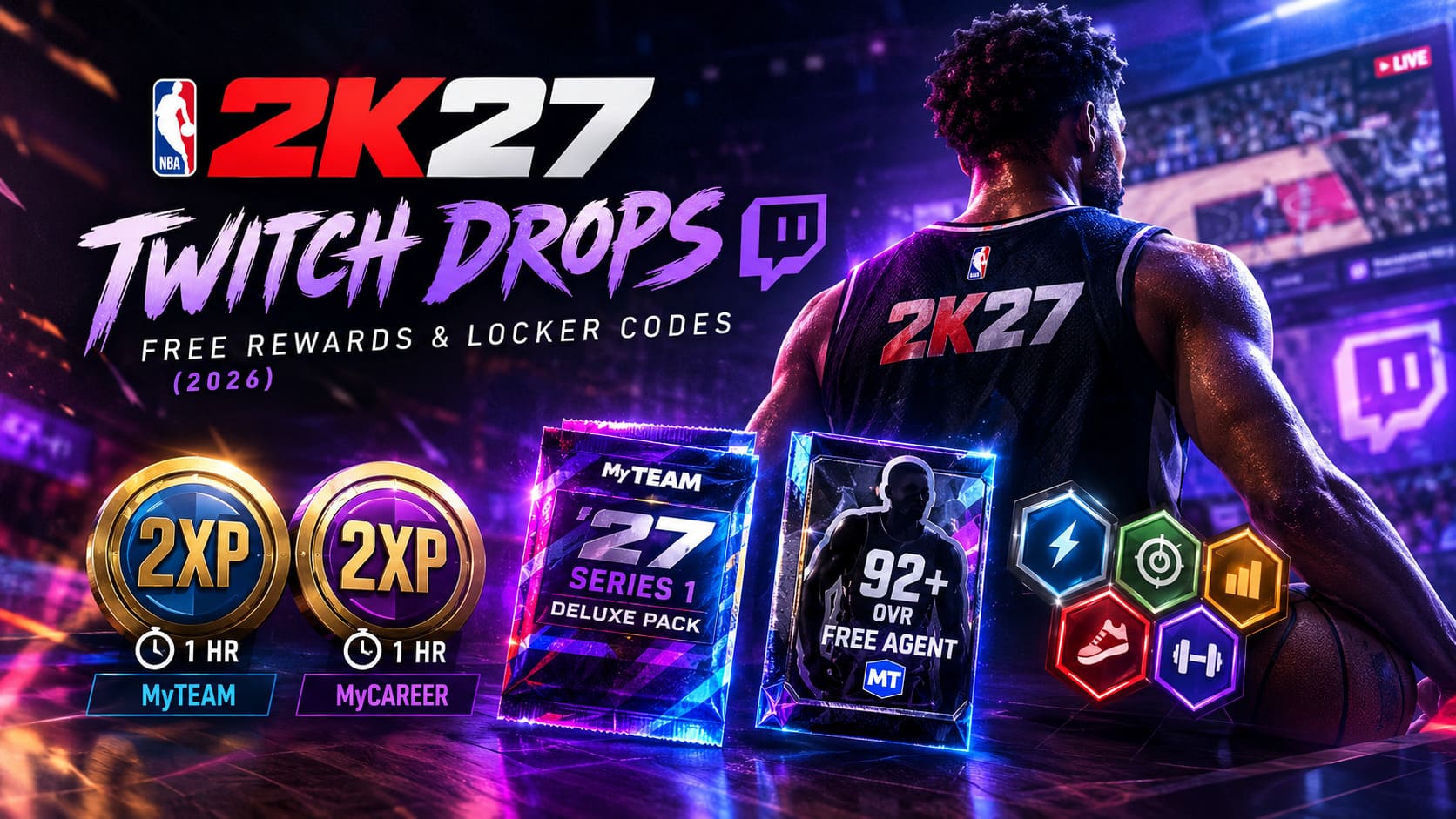
The Season 1 Twitch Drops campaign is one of those little launch bonuses that can make the early grind noticeably easier. You aren’t being asked to complete some ridiculous challenge or spend VC just to qualify. Instead, you watch eligible NBA 2K27 streams, hit specific time milestones, claim the rewards, and then use them in-game.
And after spending quite a bit of time with the new game, I genuinely think these drops are worth collecting. The early 2XP boosts are useful, the MyTEAM pack can help when you’re still building your roster, and the later rewards are particularly nice if you’re trying to avoid wasting VC during the first weeks of the season.
So, if you’re already watching NBA 2K27 content on Twitch, you might as well make those hours work for you.
When Are the NBA 2K27 Season 1 Twitch Drops Available?
The Season 1 Twitch Drops campaign is tied directly to the launch period of NBA 2K27. According to the campaign schedule provided for the promotion, the event runs from August 25, 2026, at 9:00 AM PT through September 22, 2026, at 9:00 AM PT.
That gives players several weeks to collect the available rewards. If you’re reading this during the campaign, I wouldn’t leave it until the final day. Twitch rewards can occasionally take time to update, and launch-period server traffic is exactly when you don’t want to discover that your accounts aren’t connected correctly.
| Milestone | MyTEAM Reward | MyCAREER Reward |
|---|---|---|
| 45 Minutes | 1-Hour 2XP Coin | 1-Hour 2XP Coin |
| 2 Hours | MyTEAM ’27 Series 1 Deluxe Pack | 1-Hour 2XP Coin |
| 4 Hours | 92+ OVR Free Agent Pack with 5-Game Contract | 5x Skill Boosts in All Categories |
What You Actually Get From the Drops
This is where I think the campaign gets interesting. None of these rewards are going to magically turn a brand-new account into a competitive endgame monster, but they are useful at exactly the stage when most players need them.
The 45-Minute Drop
The first milestone requires just 45 minutes of eligible viewing. You receive a 1-hour 2XP Coin for MyTEAM and another 1-hour 2XP Coin for MyCAREER.
For me, this is easily the easiest reward to recommend. Forty-five minutes isn’t much. If I’m watching a creator while eating dinner or checking out a new build guide, I can hit this milestone without even thinking about it.
The important part is using the coins intelligently. I wouldn’t activate them simply because they’re sitting in my inventory. Save them for a session where you’re actually going to play for the full duration.
The 2-Hour Drop
At two hours, things get more interesting. The MyTEAM reward is a Series 1 Deluxe Pack, while MyCAREER gives you another 1-hour 2XP Coin.
The Deluxe Pack is especially helpful early in the game, when your lineup probably still looks like a collection of players you’ve picked up from starter rewards and basic challenges. It’s also marked as unauctionable, so don’t expect to turn the pack into a pile of MT.
Personally, I see it as a roster-building reward rather than an economy reward. Open it, see what you get, and move on.
The 4-Hour Drop
The final milestone requires four hours of eligible Twitch viewing. That’s a much bigger commitment, but the rewards are also considerably more interesting.
MyTEAM players receive a 92+ OVR Free Agent Pack with a five-game contract. In MyCAREER, you get five Skill Boosts across all categories.
The Free Agent reward is temporary, so don’t treat it like a permanent superstar addition to your roster. I would save it for a difficult challenge, a competitive session, or a moment when having a high-rated player can make a noticeable difference.
The Skill Boosts are probably my favorite part of the final tier. Early in MyCAREER, every little performance improvement matters, and getting boosts without spending VC is always welcome.
How I Set Up NBA 2K27 Twitch Drops
The setup sounds more complicated than it actually is. The biggest mistake you can make is starting a four-hour stream before checking whether your accounts are properly connected.
First, make sure you have an active Twitch account and a 2K account connected to the platform you’re using to play NBA 2K27. This can include PlayStation 5, Xbox Series X|S, Steam on PC, or Nintendo Switch 2.
Then head to the official NBA 2K Twitch Drops page and sign in. You’ll be asked to authenticate your Twitch account and connect the gaming platform associated with your NBA 2K27 profile.
Take a second to double-check the account you’re connecting. This is particularly important if you have multiple console profiles or more than one Twitch account. You don’t want to spend two hours watching NBA 2K27 content only to discover that the progress was attached to the wrong account.
How to Earn and Claim the Rewards
Once everything is linked, the process becomes fairly straightforward.
- Find an eligible NBA 2K27 Twitch stream. Look for broadcasts with Twitch Drops enabled.
- Watch the stream. Your viewing progress should begin tracking automatically when the broadcast qualifies for the campaign.
- Check your Twitch Drops inventory. This is where you can see your progress toward the next milestone.
- Claim each completed reward. Don’t assume that reaching the required time means you’re finished. If Twitch asks you to claim the reward, actually claim it.
- Check the NBA 2K Twitch Drops portal. If the promotion uses account-specific Locker Codes, this is where the claimed reward can become available.
- Redeem the reward in NBA 2K27. Follow the in-game Locker Code or reward redemption process associated with the campaign.
One thing I’d strongly recommend is checking your Twitch inventory occasionally instead of leaving everything until the end. It’s much easier to notice a problem after 45 minutes than after you’ve invested four hours.
Do You Need to Watch the Official NBA 2K Twitch Channel?
Not necessarily. The important thing is that the broadcast you’re watching is participating in the Twitch Drops campaign.
That means you should pay attention to the Drops Enabled indicator rather than simply choosing a random NBA 2K27 stream because it has a lot of viewers.
This is actually convenient because I prefer watching smaller creators sometimes. The chat can be more relaxed, and you’re still able to make progress if the broadcast is eligible.
My Favorite Way to Farm the Drops
Here’s the method I’ve been using: I put an eligible NBA 2K27 stream on a second screen or mobile device while I’m doing something else.
If I’m grinding MyCAREER, I’ll have Twitch running nearby. If I’m working on a roster or messing around in the menus, I’ll let the stream continue in the background. I don’t consider the four-hour milestone something worth sitting down specifically to watch unless the creator is actually entertaining me.
And that’s the real advantage of Twitch Drops. You don’t have to choose between watching NBA 2K27 content and playing NBA 2K27. You can often do both.
On mobile, I also recommend lowering the stream quality if bandwidth is an issue. You don’t need a beautiful 1080p picture of someone shooting jumpers for four hours just to earn a digital reward.
Common NBA 2K27 Twitch Drop Problems
My Watch Time Isn’t Increasing
This is probably the first thing I’d check if your progress seems frozen.
Make sure the stream actually has Drops enabled. Then check that Twitch is recognizing your viewing session correctly. If you’re jumping between several eligible streams, simplify things and stick with one broadcast for a while.
I also wouldn’t immediately assume that every issue is caused by your account. Twitch and game servers can have problems too, especially during a major launch.
The 2K Website Won’t Load My Rewards
If your Twitch progress is correct but the 2K reward page isn’t showing anything, try the boring fixes first: sign out, sign back in, refresh the page, and try a private browser window.
Switching browsers can also help. If the campaign has just launched or a major NBA 2K27 event is happening, server congestion can make reward pages behave strangely.
My Locker Code Says Invalid
Before panicking, check that you’re entering the code exactly as displayed. Watch for similar-looking characters and make sure you’re using the account associated with the reward.
If the code is account-specific, sharing it with another player won’t make it transferable. These rewards are intended for the account that earned them.
Should You Save Your 2XP Coins?
This is one of those questions where my answer is: don’t overthink it, but don’t waste them either.
If you’re going to play MyCAREER for an hour, activate the MyCAREER 2XP Coin before starting a serious session. The same idea applies to MyTEAM.
I wouldn’t activate a coin just because I logged into the game for five minutes. That’s basically throwing away free progression.
At launch, I’m especially interested in using these boosts when I know I’ll have a longer uninterrupted gaming session. That’s when the extra experience actually feels worthwhile.
Are NBA 2K27 Twitch Drops Worth Your Time?
Yes, especially if you’re already a Twitch viewer.
If you never watch NBA 2K27 content, I wouldn’t tell you to spend four hours staring at a stream you don’t enjoy just because there’s a temporary Free Agent card at the end. Games are supposed to be fun.
But if you already watch NBA 2K27 creators, the decision is much easier. You’re effectively getting extra rewards for something you were already doing.
The 45-minute tier is practically a no-brainer. The two-hour reward is useful during the early roster-building phase, and the four-hour tier gives both MyTEAM and MyCAREER players something meaningful.
Should You Upgrade to NBA 2K27 if You Already Have NBA 2K26? A Complete Breakdown
My Final NBA 2K27 Twitch Drops Checklist
- Connect Twitch and your 2K gaming account before watching.
- Choose a broadcast with Drops Enabled.
- Monitor your progress through Twitch’s Drops inventory.
- Claim completed rewards instead of assuming they’re automatically collected.
- Check the official 2K reward portal if a Locker Code is required.
- Redeem your rewards before the campaign deadline.
- Use 2XP Coins during real gameplay sessions rather than activating them randomly.
NBA 2K27 Next-Gen Graphics Settings: PC vs. PS5 Detailed Comparison and Optimization Guide
Final Thoughts From a Player’s Perspective
NBA 2K27 already has enough systems competing for your attention. Between MyCAREER progression, MyTEAM, seasonal rewards, builds, challenges, and everything else happening around the launch, I’m not interested in adding another tedious grind to the list.
That’s why I actually like the idea behind these Twitch Drops.
They’re not revolutionary, and they aren’t going to completely change your NBA 2K27 experience. But they’re a nice bonus for players who are already watching the community. A few hours of watching streams can translate into 2XP, packs, a temporary high-rated player, and Skill Boosts without opening your wallet.
My advice is simple: link your accounts early, grab the 45-minute reward first, and then decide whether the higher tiers are worth pursuing for your playstyle. If you’re already following NBA 2K27 creators, there really isn’t much downside to letting the Drops work in the background.
And for me, that’s the sweet spot. I get to discover new builds, hear other players argue about badges and jump shots, keep up with the NBA 2K27 community, and quietly collect free rewards while I’m at it.
That’s a pretty good deal for a launch-season grind.