How to Preload Call of Duty: Modern Warfare 4 Beta (2026) – Complete Guide for All Platforms
If there is one thing I hate about Call of Duty beta weekends, it is wasting the first hour staring at a download bar. Everyone else is already playing, people are discovering the new maps, and you’re still watching Steam crawl from 37% to 38%.
That is exactly why preloading the Call of Duty: Modern Warfare 4 Beta is worth doing as early as possible.
The 2026 beta is being rolled out across two weekends, with Early Access arriving first and the free Open Beta following shortly afterward. Activision is also supporting a wider range of platforms this time, including PS5, Xbox Series X|S, PC, and Nintendo Switch 2 during the open period.
I’ve gone through the beta schedule, platform requirements, preload windows, and the practical stuff that can actually trip players up. Here’s everything you need to know before MW4 servers open.
Modern Warfare 4 Beta Dates and Times
The beta is divided into two separate testing periods. The first is aimed at players with Early Access, while the second opens the doors to everyone.
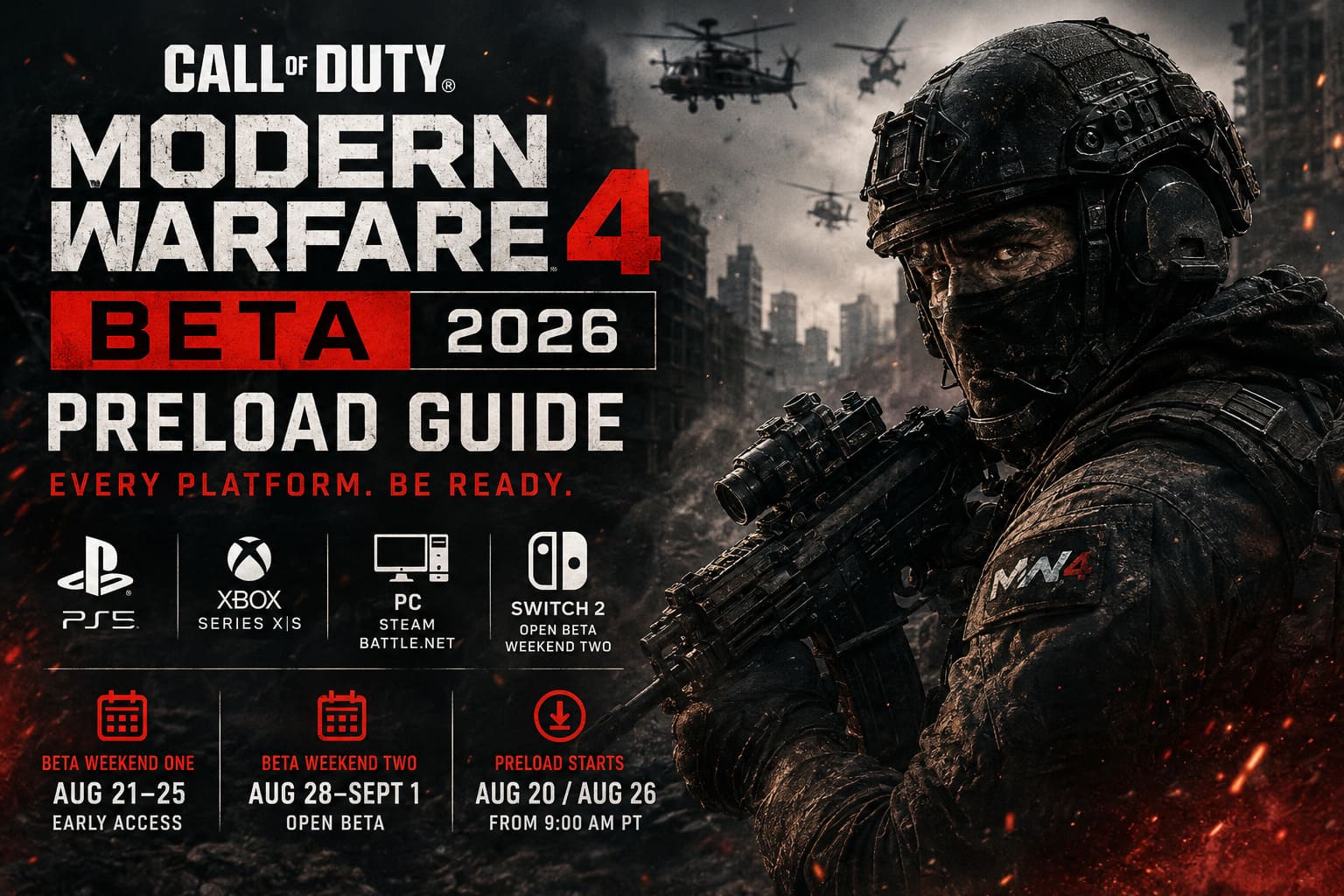
| Beta Phase | Start | End | Who Can Play |
|---|---|---|---|
| Weekend One | Aug. 21, 2026 – 11:00 AM PT | Aug. 25 – 10:00 AM PT | Early Access Players |
| Weekend Two | Aug. 28, 2026 – 10:00 AM PT | Sept. 1 – 10:00 AM PT | Everyone |
For players on the East Coast of the United States, that means 2:00 PM ET on August 21 for Weekend One and 1:00 PM ET on August 28 for the Open Beta.
The first weekend is available to players who pre-ordered Modern Warfare 4 or obtained an Early Access code through an eligible promotion. Weekend Two is the big one: the Open Beta is free, with no pre-order required.
One important catch is that Nintendo Switch 2 players miss Weekend One. The Switch 2 version joins the party during the Open Beta.
When Can You Preload the MW4 Beta?
This is the information I would personally save somewhere instead of trusting myself to remember it.
| Beta | Preload Begins | Pacific Time | Eastern Time |
|---|---|---|---|
| Weekend One | Aug. 20, 2026 | 9:00 AM PT | 12:00 PM ET |
| Weekend Two | Aug. 26, 2026 | 9:00 AM PT | 12:00 PM ET |
The timing gives players a decent window to get everything installed before the servers become busy.
And trust me, do not wait until launch day if your internet connection is anything less than lightning fast. Call of Duty installations are rarely tiny, and beta traffic can make downloading during the final hours unnecessarily painful.
There is also some good news for Early Access players. If you install the beta for Weekend One, you should not have to start the entire download again for Weekend Two. The client is expected to receive an update patch before the second weekend.
How to Preload Modern Warfare 4 Beta on PS5
The PlayStation 5 process is pretty straightforward.

- Start your PS5 and sign into your PlayStation Network account.
- Open the PlayStation Store.
- Search for Call of Duty: Modern Warfare 4 Beta.
- Open the official beta listing.
- Select Download when the option becomes available.
- Check the download progress through your PS5 downloads screen or Game Library.
If you’ve already pre-ordered MW4 digitally, the beta access should be connected to your account.
My advice here is simple: start the preload as soon as it becomes available. Don’t assume you’ll remember later, especially if you’re planning to play the moment the servers open.
Xbox Series X|S Beta Preload
Xbox players have one extra wrinkle to watch.
The initial preload may function more like a placeholder installation, with additional core beta assets becoming available afterward. That means seeing a surprisingly small download does not necessarily mean you’ve finished installing everything required to play.
For Xbox:
- Open the Microsoft Store.
- Search for the Modern Warfare 4 Beta.
- Select the beta client.
- Choose Install.
- Leave automatic updates enabled.
- Keep the console in its connected standby mode so additional files can download automatically.
The additional asset rollout is scheduled around the Early Access launch window, so I would check the installation again before August 21 rather than assuming the first download was the complete package.
Preloading on Steam
Steam remains the easiest PC option for most players.
Open Steam and search for Call of Duty: Modern Warfare 4. From the game’s store page, look for the beta access section and select the option to install or preload the beta when it becomes available.
Then:
- Choose your preferred SSD.
- Start the installation.
- Let Steam finish the download and file allocation.
- Check for updates before launch.
I’d strongly recommend using an SSD rather than an older mechanical hard drive. Even if the beta technically installs elsewhere, faster storage can make the whole experience much less frustrating when you’re dealing with a modern Call of Duty client.
Also, don’t leave Steam in Offline Mode expecting everything to work. Give it a chance to download any final update before the servers open.
Battle.net Beta Installation
Battle.net handles things a little differently.
- Launch the Battle.net desktop client.
- Sign into your account.
- Open the Call of Duty section.
- Look for the game version selector near the main installation/play button.
- Select the Modern Warfare 4 Beta option if available.
- Choose your installation directory.
- Start the download.
If the beta option doesn’t immediately appear, restart Battle.net and check for client updates. Sometimes the launcher itself needs to refresh before new products or versions become visible.
Nintendo Switch 2 Preload
Nintendo Switch 2 players get access during Weekend Two rather than the Early Access period.
The Open Beta preload is scheduled to begin on August 26 at 9:00 AM PT.
From the Switch 2 home screen:
- Open the Nintendo eShop.
- Search for Modern Warfare 4 Open Beta.
- Select the official software listing.
- Choose Free Download.
- Keep the console connected to Wi-Fi until the installation is complete.
Because the Switch 2 version isn’t part of Weekend One, there’s no reason to panic if you cannot find an Early Access download.
Can You Play Early Without Pre-Ordering?
Yes, potentially.
Pre-ordering is the simplest route to Early Access, but promotional beta codes can also provide entry.
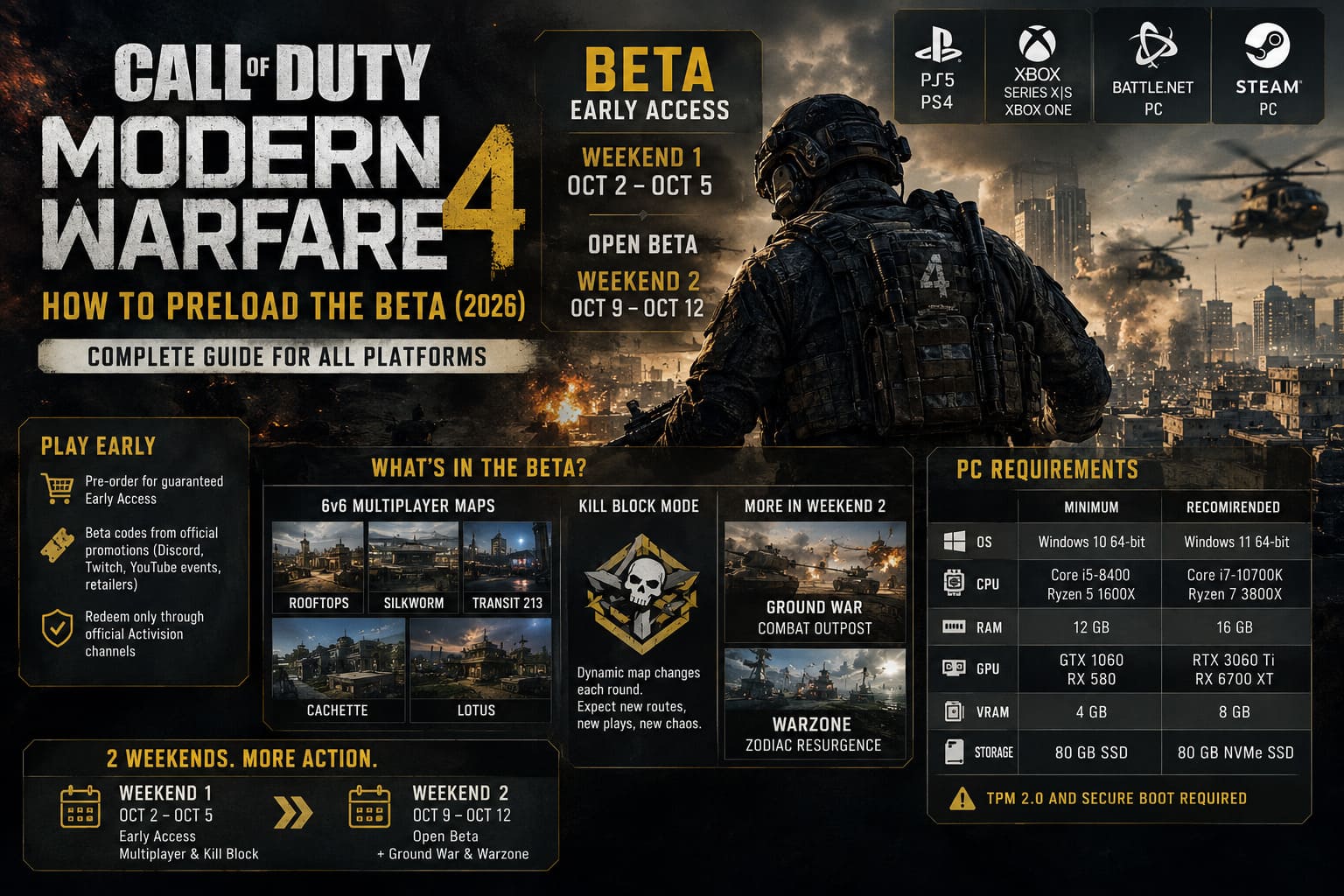
Potential sources include promotional campaigns connected to Discord Nitro, official Call of Duty broadcasts, Twitch or YouTube events, and participating retailers.
However, I would be careful with random websites promising “free MW4 beta codes.” The Call of Duty community is full of fake giveaways whenever a new game launches.
If you’re using a code, redeem it through an official Activision-related process rather than handing your account details to some suspicious third-party page.
And remember: the Open Beta removes much of this hassle anyway. If you don’t get Early Access, you can still play during Weekend Two.
PC Requirements for Modern Warfare 4 Beta
PC players should make sure their hardware is ready before launch day.
| Component | Minimum | Recommended |
|---|---|---|
| OS | Windows 10 64-bit | Windows 11 64-bit |
| CPU | Core i5-8400 / Ryzen 5 1600X | Core i7-10700K / Ryzen 7 3800X |
| RAM | 12 GB | 16 GB |
| GPU | GTX 1060 / RX 580 | RTX 3060 Ti / RX 6700 XT |
| VRAM | 4 GB | 8 GB |
| Storage | 80 GB SSD | 80 GB NVMe SSD |
One thing I would not ignore is Windows security configuration. The PC version is expected to rely heavily on Activision’s anti-cheat and security requirements, with TPM 2.0 and Secure Boot relevant to supported configurations.
If you’ve never checked those settings, do it before the beta rather than five minutes before the servers open.
What Can You Actually Play in the Beta?
This isn’t shaping up to be one of those tiny betas where you get two maps and a single mode and call it a day.
The planned content includes several major pieces of Modern Warfare 4.
6v6 Multiplayer
The beta features several new multiplayer environments, including:
- Rooftops
- Silkworm
- Transit 213
- Cachette
- Lotus
For me, this is still the part that matters most. You can read a hundred marketing descriptions, but nothing tells you whether a Call of Duty map is actually good like playing it repeatedly at 2 AM while questioning every life decision that led you there.
Kill Block Mode
The new Kill Block mode is one of the more interesting additions.
Its defining feature is changing battlefield geometry. Walls, pathways and defensive positions can shift between rounds, meaning players can’t simply memorize one optimal route and repeat it forever.
That could be genuinely refreshing if the changes are meaningful rather than cosmetic.
Call of Duty has always lived or died by map flow, so I’m particularly curious to see whether this mechanic creates interesting tactical decisions or just more chaos.
Ground War and Warzone Content
The second weekend expands the experience further with Ground War, including the large Combat Outpost map.
Warzone players also have something to look forward to with the ZODIAC Resurgence experience, which is scheduled for the Open Beta period.
That makes Weekend Two considerably more attractive even for players who aren’t interested in Early Access.
Call of Duty Modern Warfare 4 Vault Edition Pre-Order Rewards Guide (2026)
What I Recommend Doing Before Launch
If you’re planning to jump into MW4 the second the servers go live, don’t overcomplicate things.
- Preload immediately when your platform unlocks the download.
- Keep at least 80 GB of free SSD space, with additional room available for updates.
- Update your GPU drivers and Windows before launch day.
- Restart the game launcher or console and check for a final patch shortly before the beta begins.
I’d also avoid downloading a bunch of other games or huge updates at the same time. Call of Duty betas can already put enough pressure on your connection.
Should You Pre-Purchase Call of Duty: Modern Warfare 4 on Steam? (2026 Buying Guide)
Final Thoughts
The Modern Warfare 4 Beta is arriving with a fairly aggressive schedule, and preloading is easily the smartest thing you can do before the servers open.
Weekend One starts on August 21 for Early Access players, while Weekend Two begins August 28 and opens the beta to everyone. PS5, Xbox Series X|S, Steam and Battle.net players get the first opportunity, while Nintendo Switch 2 joins with the free Open Beta.
Personally, I wouldn’t wait until launch day. Get the client installed, update everything, make sure your storage is ready and then forget about it until the servers go live.
Because there is nothing worse than seeing your friends already grinding the new multiplayer maps while you’re sitting there at 12% wondering why you didn’t preload the damn thing yesterday.
Preload first. Shoot zombies, operators, or whatever Infinity Ward throws at us afterward.