WheelMates Friends Pass: How Does It Work? Complete Co-op Guide (2026)
I’ve played more co-op games than I can reasonably count, from tightly scripted two-player adventures to chaotic physics sandboxes where the real enemy is usually your friend. One thing I’ve learned is that the price of entry can make or break a co-op game.
That is why the Friends Pass in WheelMates immediately caught my attention.
Firevolt’s upcoming RC-car adventure is built around a simple but potentially brilliant idea: two players are required to experience the game properly, but only one of them needs to purchase the full game. That is a much more player-friendly approach than asking two people to buy separate copies before they can even find out whether they enjoy playing together.
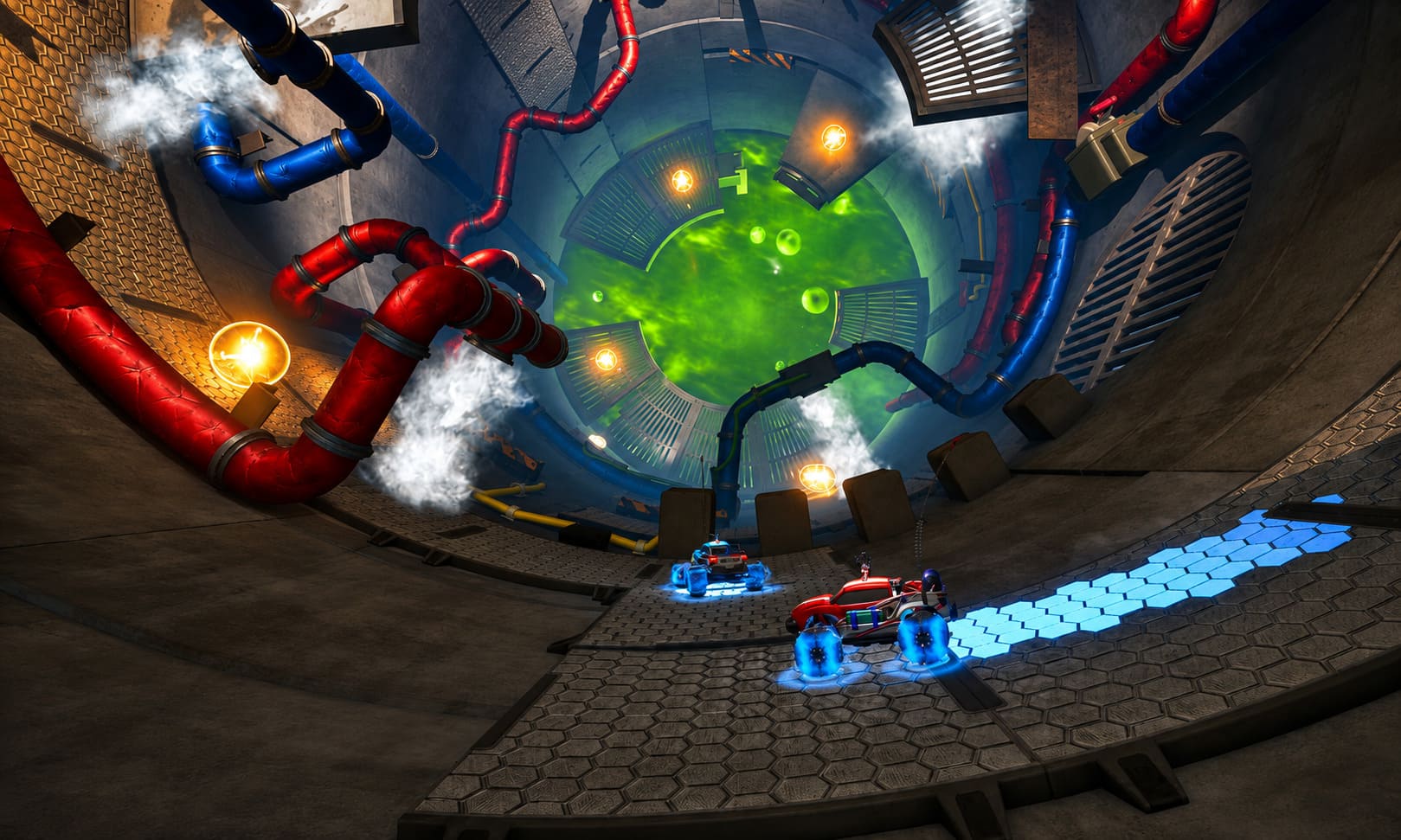
WheelMates takes the familiar cooperative formula and shrinks it down to tiny remote-controlled cars exploring an enormous laboratory hidden inside a scientist’s home. Think oversized household objects, physics puzzles, gadgets, ramps, magnets, ropes, and plenty of opportunities for one player to make a spectacular mistake while the other watches.
Here’s everything you need to know about the WheelMates Friends Pass, including how it works on Steam, what the guest can access, and which alternatives are available if you want to play locally.
What Exactly Is the WheelMates Friends Pass?
The WheelMates Friends Pass is essentially a free companion version of the game designed for the second player.
The system is refreshingly simple. One person purchases the full version of WheelMates and becomes the host. The other player downloads the free Friends Pass client and joins the host’s session.
 0
0
The important part is that the guest isn’t being handed a tiny trial with the first chapter locked behind a purchase screen.
According to the game’s planned structure, the Friends Pass is intended to let the second player participate in the full cooperative campaign while connected to an owner of the complete game.
That makes a lot of sense for WheelMates because this isn’t a game where one player can simply wander off and complete everything alone. The experience has been designed around two vehicles working together, so charging both players the full price would create an unnecessary barrier.
| Feature | Full Game Owner | Friends Pass Guest |
|---|---|---|
| Join online co-op | Yes | Yes |
| Full campaign access | Yes | Yes |
| Two-player gameplay | Yes | Yes |
| Requires game purchase | Yes | No |
| Can host sessions | Yes | No |
| Steam Deck support | Yes | Yes |
Personally, this is exactly the kind of co-op pricing model I like seeing. If I’m trying to convince a friend to play a game with me, I would much rather send them a free client than ask them to spend money before they even know whether the experience is for them.
How to Use the WheelMates Friends Pass on Steam
Getting started shouldn’t be complicated, and Firevolt’s setup follows the usual Steam invitation process.
1. One Player Buys WheelMates
Player A needs to own the full version of WheelMates on Steam.
After purchasing it, install the game normally. This player will act as the host during the online session.
2. The Second Player Downloads the Friends Pass
Player B doesn’t need to purchase another copy.
Instead, they should find the WheelMates Friends Pass on Steam and download the free companion client.
This is an important distinction: the Friends Pass isn’t simply the regular game being offered for free. It is designed specifically for joining another player’s full game.
3. Launch the Full Game
The owner starts WheelMates and enters the multiplayer portion of the main menu.
From there, the host creates an online cooperative session.
4. Invite Your Friend
The host uses Steam’s friend and invitation system to invite the person using the Friends Pass.
This is probably the easiest part of the whole process. If you’ve used Steam’s multiplayer invitation system before, you should already be familiar with the basic workflow.
5. The Guest Joins
The second player accepts the invitation and launches into the host’s session through the Friends Pass.
Once connected, both players can progress through the cooperative adventure together.
The biggest advantage is that both players aren’t being forced to purchase the game simply to participate.
Does the Friends Pass Include the Whole Campaign?
This is one of the most important questions because there is a huge difference between a genuine co-op pass and a glorified demo.
The intended Friends Pass structure gives the guest access to the complete WheelMates campaign while playing with an owner. There isn’t supposed to be a short introductory section followed by a large purchase wall.
That means the second player can participate in the game’s puzzles, exploration, upgrades, and story progression without buying the premium version.
There is, however, an important distinction regarding ownership and progression.
The host is the person who owns the full game and maintains the primary save progression. The guest can experience the adventure alongside them, but the Friends Pass shouldn’t be thought of as a completely independent copy of WheelMates.
This is fairly standard for games using a friend-pass system.
Can You Play WheelMates If Neither Player Owns It?
No.
This is probably the easiest rule to remember:

At least one player needs to own the full game.
The Friends Pass isn’t intended to turn WheelMates into a free-to-play title or function as a standalone version.
Think of it more like a digital spare seat. Your friend doesn’t have to buy a ticket, but somebody still needs to own the actual ticket for the show.
If neither person owns WheelMates, the Friends Pass won’t give you access to the full game by itself.
WheelMates on Steam Deck and PC
The PC side of WheelMates is particularly interesting because of the game’s relatively unusual format.
The game is scheduled to launch on Steam for Windows PC and Steam Deck on September 7, 2026, with Steam being the main platform for the Friends Pass at launch.
The cross-device possibilities are especially useful.
For example, you could have:
- Player A: Gaming PC with the full game
- Player B: Steam Deck with the Friends Pass
- Player A: Steam Deck with the full game
- Player B: Windows PC with the Friends Pass
That flexibility is one of the better aspects of the system. You don’t necessarily need matching hardware to play together.
And considering how many people now use a Steam Deck as their primary casual gaming machine, Friends Pass support on Steam Deck is a particularly welcome feature.
What About PS5 and Xbox?
This is where things get a little less straightforward.
Firevolt has confirmed that PlayStation 5 and Xbox Series X|S versions are in development, but those console editions are planned for a later release rather than launching alongside the initial Steam version.
The expectation is that a Friends Pass-style option will also become available on those platforms once the console versions arrive.
However, there is an important difference between saying a feature is planned and having every technical detail finalized.
Cross-play between PC and consoles has not been fully established yet.
That means I wouldn’t buy WheelMates today specifically because you expect to play between PC and a future console version. Until Firevolt confirms the final cross-platform setup, it’s safer to treat the PC Friends Pass and future console Friends Pass implementations as separate platform-specific features.
What If You’re Sitting on the Same Couch?
This is where things get even easier.
If your friend is physically next to you, you don’t necessarily need the Friends Pass at all.
WheelMates supports local two-player co-op, allowing two players to share the same system.
Grab a second controller, launch the full game, and you can play together without worrying about online invitations or connection quality.
For this kind of game, couch co-op could actually be my preferred way to play.
Physics-based cooperative games have a certain magic when both players are sitting next to each other. When one person accidentally launches the other vehicle across the room, hearing the immediate reaction is often half the entertainment.
Steam Remote Play Together Is Another Option
There is also Steam Remote Play Together, which gives PC players another way to play cooperatively with a single purchased copy.
Rather than both players running the game independently, the host essentially streams the local multiplayer experience to the second player.
The guest sends controller inputs through the connection while the host’s computer handles the actual game.
This can work well, particularly if your friend doesn’t have powerful hardware. But there is a trade-off.
Remote Play Together is still streaming, so image quality, latency, and connection stability can affect the experience.
If both players have capable hardware and the Friends Pass works as intended, I’d personally choose the dedicated Friends Pass setup for long-distance sessions.
It should provide a more natural experience because each player is running the game environment on their own machine rather than relying entirely on streamed video.
Why WheelMates Needs Two Players
The Friends Pass makes much more sense once you understand how WheelMates is designed.
This isn’t simply a single-player game with a second vehicle added for decoration.
The puzzles are built around cooperation between two tiny RC cars.
You may need one vehicle to hold a mechanism in place while the other races toward a switch. Another puzzle might require one player to use magnetic wheels to create a route while the second player uses a rope or grappling mechanic to cross a gap.
The miniature scale also changes the way familiar locations work.
A kitchen isn’t just a kitchen anymore. A countertop becomes a platforming area. A tool lying on a workbench can become an enormous obstacle. A backyard can feel like an open-world environment when your vehicle is only a fraction of the size of a normal car.
The main cooperative mechanics include:
- Magnetic wheels for climbing and attaching to metal surfaces.
- Ropes and grappling tools for crossing large gaps.
- Jump and boost mechanics for navigating oversized environments.
- Object-based puzzles that require both players to manipulate the environment.
- Shared exploration and story discovery as you investigate the missing scientist’s laboratory.
And importantly, the game isn’t relying on conventional combat to keep things exciting.
The environment itself is the challenge.
WheelMates Preorder Bonus Car Parts List & PC System Requirements Explained
Is the Friends Pass Actually Worth Using?
Absolutely, assuming the final implementation matches the advertised structure.
I’ve always thought cooperative games are at their best when they make it easy to get another person involved. Requiring two full purchases can be a surprisingly big obstacle, especially for an indie game that players might only experience with one particular friend.
WheelMates avoids that problem elegantly.
If you’re the person who wants to introduce the game to a friend, you buy one copy. Your friend downloads the Friends Pass, accepts the invitation, and you can start playing together.
That is considerably easier than trying to convince someone to spend money on a game they haven’t seen in action.
The combination of mandatory two-player design, full campaign access for the guest, Steam support, and local co-op makes WheelMates’ multiplayer setup one of its more interesting features.
Is WheelMates Coming to PS5 and Xbox Series X/S? Release Date and Console Launch Details
WheelMates Friends Pass: Quick Verdict
For players wondering whether the Friends Pass is worth setting up, the answer is pretty straightforward.
One full copy is enough for two people to experience the cooperative campaign together. The second player uses the free Friends Pass rather than purchasing another copy.
For online PC gaming, that’s arguably the best option. For local play, you can simply use the built-in couch co-op. Steam Remote Play Together provides another fallback when needed.
The only major question mark is the console ecosystem. PS5 and Xbox Series X|S versions are planned, but cross-play and the final console Friends Pass implementation still need clearer confirmation.
Otherwise, this is exactly the kind of feature I’d like to see become more common in co-op games.
When a game is specifically designed to be played with another person, there’s something refreshing about the developer saying, essentially, one of you buying it is enough.
And if WheelMates manages to make its physics-driven puzzles as entertaining as its multiplayer model suggests, having a friend join you without buying a second copy could turn out to be one of the smartest decisions Firevolt made.